Visma/SPCS: Integration to Visma Administration - Textalk Abicart

Integration with Visma/SPCS is available in Abicart Pro. Note that the program requires the Visma Integration add-on (sold by Visma).
With this connection you can transfer...
- orders and customers from Abicart to Visma/SPCS (you can choose between transferring orders from a certain date or only downloading new ones),
- customer records from Visma/SPCS to Abicart
- all or part of the product register from Abicart to Visma/SPCS and vice versa
- stock status from Visma/SPCS to Abicart (both manually and using a function that regularly sends the current stock status to Abicart).
To get started:
1. Select the Visma SPCS add-on under "My subscription"
2. go to the Integration page (Settings >> External connections >> Visma)
3. Download the latest version + Download installation instructions
4. Follow the instructions
Contact information for Visma
Website: http://www.vismaspcs.se
Phone: 0771 / 44 22 00
Settings in the shop's administration area
When the add-on service is activated, go to Settings -> External connections -> "Visma integration" tab.
In the fact box to the right you will download the application and an installation manual. Read through and then follow the instructions to activate the connection.
Fill in the username and password. You decide the password yourself, which must be entered in the integration program for each transfer.
Things to keep in mind
There are three components that you as a store owner need for the integration between Textalk Webshop and Visma Administration to work:
- Visma Administration (purchased by Visma),
- Visma Integration (an add-on to Visma Administration purchased by Visma),
- our Widows application for integration between Abicart and Visma.
Frequently asked questions and answers
Q: I get "Error code 137" when I start the integration program
A: The path to Visma Administration is incorrect. In the integration program, you need to enter the path to your local "Visma Administration" installation, e.g. C:\Documents and Settings\Application Data\Visma Administration.
Q: Can I transfer the customer register from Visma to Abicart and vice versa?
A: There is a function in our integration program to transfer the Visma customer register to Abicart. You cannot export the entire customer register from Abicart to Visma, but as soon as an order is exported, the customer is also exported. This means that all customers who place an order will be transferred to Visma when the order is exported.
Q: I get "Error code 583" when I start the integration program
A: Your Visma Administration license is not valid for Visma Integration. Please contact Visma SPCS for information and to change your license.
Q - I have just updated Visma Administration and now get error code 676 when I log in. What is the error?
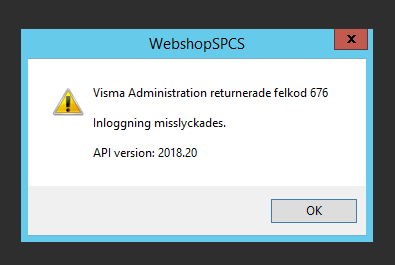
A - The error occurs because a new function has been activated in Visma called "Authorization Control". This means that when the integration program starts, the program needs to "log in to Visma" with the user information you have created in Visma.
You manage this under File -> Users in Visma Administration

Q: Our firewall stops communication from Abicart. How do we solve this?
A: In order for the integration program to be able to retrieve orders from Abicart, you need to make sure that https traffic (TCP port 443) to 192.121.104.141 is let through by your firewall.
You can try to open a browser on the same computer as the integration program is running on and open https://admin.abicart.se/se/editor. If it works, everything is set up correctly.