Manage 301 redirects - Textalk Abicart

What is a 301 redirect?
301 redirect is a permanent redirect that tells the web browser and search engines that the page has moved from “Old URL” (destination A) to “New URL” (destination B). It is important on two major reasons:
Retaining your search ranking: Search Engines consider the linking of one page to another as an important aspect. So when you tell the search engine that the page is permanently moved from URL 1 to URL 2, it will help to properly transfer the pages thus preserving your SEO to maintain your search engine ranking.
User Experience: Without a 301 redirect, users trying to access the old URL would encounter a frustrating error message, like a "404 Not Found" page. A 301 redirect automatically sends them to the new page, ensuring a smooth experience and improving customer satisfaction with your website.
This is mainly important to the people who change domain name, move platforms or move the webpage location.
Why 301 redirect?
As a seller, it's important to avoid your online store pages leading to a 404 page and to do a proper redirect. The reason is that when you move platforms, all your old pages already indexed by Google will lead to a "404 Not Found" page and become inaccessible.
A 301 redirect therefore tells the browser that the page has been moved and instead provides the alternative URL link to be displayed.
Importing 301 redirects in Abicart
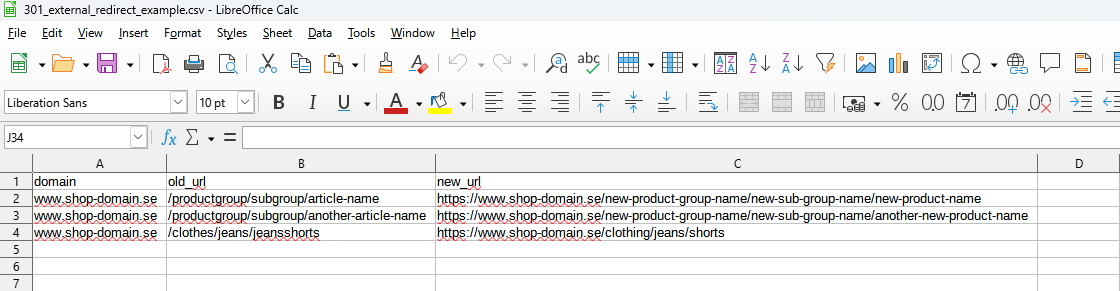
Create an Excel document with THREE columns:
- Domain for old address without http - e.g. "www.er_domän.com"
- Path of old URL (not domain) including slash, e.g. "/index.php?main_page=index&cPath=47_56"
- New complete URL, e.g. "http://www.er_domän.se/se/grp/orhangen.php"
Then attach the file in a message to customer service and we can import it for you.
NOTE!
Example: Example
This is what the file should look like. You can download the example file under "Attachment" at the bottom of the page.
How do I do an internal 301 redirect after deleting a page?
If you change the file name of a product or product group, a 301 redirect will be automatically created from the old URL to the new one.
- Go to https://admin.abicart.se/backend/jsonrpc/v1/console/
- Type Admin.login("username", "password") and click enter.
Username: Your Abicart login username
Password: Your Abicart login password
- Copy the code from the result and paste it under the "Auth" field on the right.
- Then add this code: For example:
Url.redirect("https://(OLD URL)", "https://(NEW URL)") and then click enter.
If it goes through successfully, it will return this {} as a result.
If it says forbidden, it means that the old link is still valid or hidden on the site and it can't perform the 301.
My store has a lot of links in the search engines that go to 404 pages. Is it possible to redirect these to the homepage instead?
According to Google's recommendations, you should not make 301 links to the home page on old pages/products that no longer exist. You should only create a 301 link if there is another page with identical content to the previous page.
If you redirect old pages (404 pages) to the start page, you are technically doing a so-called "soft 301 redirect" and Google senses this and interprets it as "manipulation" (which it actually is) and then you can instead be penalized by being removed from the search engines.
Google says that there is nothing wrong with "real" 404 pages and you will not be penalized for this. You have the option to edit the appearance of the 404 page in the store and make sure there is a link to the store's home page so that the visitor can easily click through and continue shopping in the store. You edit this page under Pages >> System Pages >> 404 Pages ("The specified page could not be found").
Contact customer service
If you have any questions, please contact Abicart customer service.